RAPID Module
The Pick[+] RAPID module communicates with the Pick[+] server using RAPID's SocketConnect. The robot initiates the outbound TCP connection to the Pick[+] PC.
Before you start
Before using these functions, make sure your robot is properly configured as described in ABB Configuration.
PP_Configure must be called at the beginning of your program before any other Pick[+] function.
Installation
The Pick[+] module is a plain RAPID module that must be loaded into your robot program. This is the first step to build the robot program for your application. Follow the instructions below.
-
Launch RobotStudio and navigate to the RAPID tab.
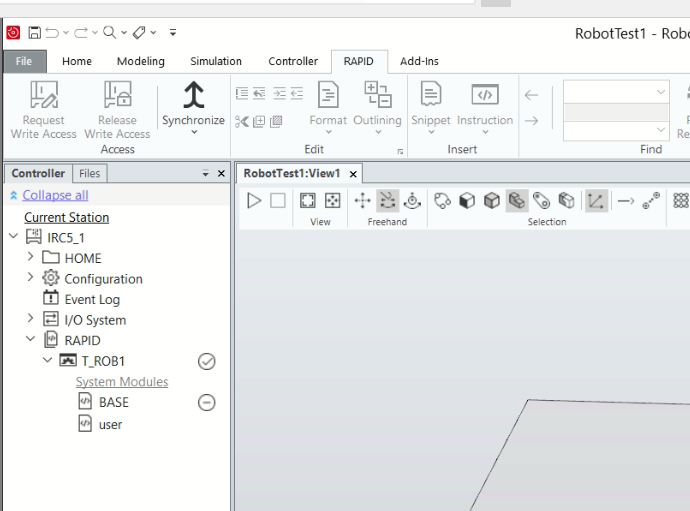
-
Right-click on the RAPID task where you want to install the Pick[+] module (usually
T_ROB1).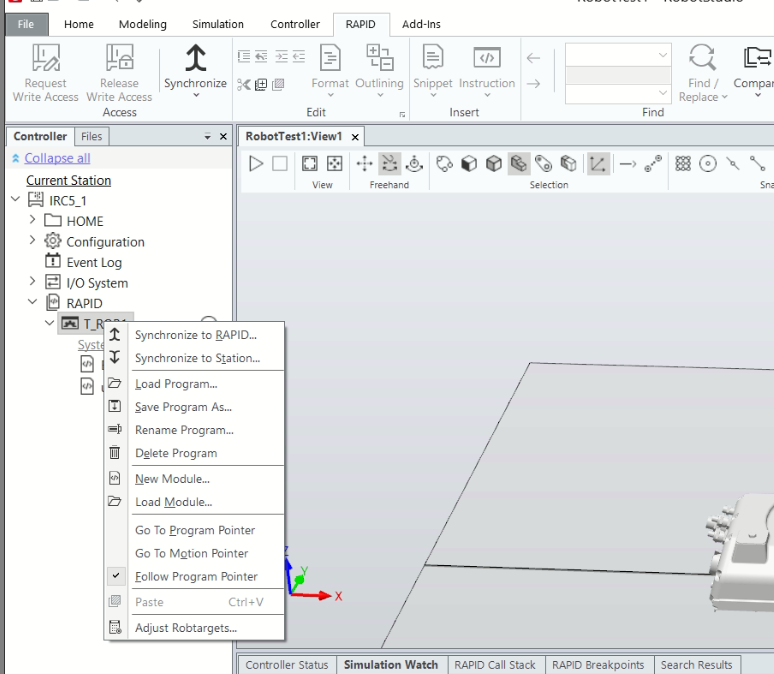
-
Click Load Module, then browse to the location of the Pick[+] module on your machine. Select the module and click OK to confirm. Once loaded, all Pick[+] functions will be available throughout your program.
![Load the Pick[+] module](/3.x/assets/3.x/user_guide_assets/robot_application/abb_application/abb_load_module.png)
Functions
For the global variables updated by these functions, see the Global Variables Reference.
Process ID format
The proc_id must always follow the format b0_<application>, where <application> is the application name configured in Pick[+]. For example, an application named bin_picking uses b0_bin_picking.
PP_Configure
Configures the connection to the Pick[+] server. Must be called before any other Pick[+] function.
| Parameter | Type | Description |
|---|---|---|
ip |
string | IP address of the Pick[+] server (e.g. "192.168.1.50") |
proc_id |
string | The process ID associated with your Pick[+] application |
\port |
num (optional) | Communication port. Defaults to 30040 |
PP_ProcessStatus
Checks the current execution mode of the Pick[+] process. Updates PP_ROUTINE and PP_ROUTINE_ERROR. Use this to verify the system is ready before triggering.
PP_Trigger
Instructs the Pick[+] server to capture an image and initiate pick candidate detection using the current tool flange pose. No parameters required.
PP_ConfigTrigger
A highly customizable trigger that filters detections by category, bin, model ID, and picking angle. Use this instead of PP_Trigger when filtering is required.
| Parameter | Type | Description |
|---|---|---|
categories{*} |
string array | Categories to include or exclude |
categories_subtract |
bool | If TRUE, listed categories are excluded. If FALSE, only listed categories are searched |
environments{*} |
string array | Bins Names to restrict the pick region to |
environments_subtract |
bool | If TRUE, listed Bins Names are excluded. If FALSE, only listed Bins Names are searched |
models_ids{*} |
string array | Model IDs to include or exclude |
models_ids_subtract |
bool | If TRUE, listed model IDs are excluded. If FALSE, only listed model IDs are searched |
max_angle |
num | Maximum picking angle in degrees. Candidates exceeding this angle are disregarded |
Each array works together with its _subtract flag: the array says which items the flag applies to, and the flag says whether that array is the set to search or the set to skip.
environments{1} := "bin_left";
environments_subtract := FALSE;   ! search only bin_left

environments{1} := "bin_left";
environments_subtract := TRUE;    ! search every bin except bin_left
Leaving an array empty
An empty array with its flag set to TRUE excludes nothing, so no filter is applied and everything is searched. For environments this means all the bins of the selected scene. The opposite combination, an empty array with the flag set to FALSE, means "search only the listed items" with nothing listed.
PP_Output
Requests the picking pose from the Pick[+] server. Updates PP_FOUND, PP_POSE, PP_CATEGORY, PP_MODEL, and PP_PICK_ID. Call this in a loop while PP_FINDING is TRUE.
| Parameter | Type | Default | Description |
|---|---|---|---|
\retry_object |
bool (optional) | FALSE |
If TRUE, requests the same instance as the previous pick |
\timeout |
num (optional) | 5 |
Response timeout in seconds |
Example Program
The example below shows how to integrate the Pick[+] functions into a standard pick-and-place loop. It is also provided by BitMetrics with the Pick[+] RAPID module.
Before running
Make sure all move poses in the example are valid for your use case before executing it.
MODULE PickPlusExample

    PROC main()
        ! Filter configurations
        VAR string categories{1}:=[""];
        VAR bool categories_subtract:=TRUE;
        VAR string environments{1}:=[""];
        VAR bool environments_subtract:=TRUE;
        VAR string models_ids{1}:=[""];
        VAR bool models_ids_subtract:=TRUE;
        VAR num max_angle:=180;

        ! Movement parameters
        VAR speeddata v_traj:=[100,50,100,50];
        VAR robtarget move_target;
        VAR num ret;
        VAR jointtarget jt;
        VAR jointtarget current_jt;

        ! Configure connection to PickPlus backend
        PP_Configure "192.168.1.50", "b0_test_proc", \port:=30040;

        WHILE TRUE DO
            ! Send configured trigger with filter parameters
            PP_ConfigTrigger categories, categories_subtract,
                environments, environments_subtract,
                models_ids, models_ids_subtract, max_angle;

            ! Request output until pick found, search stopped, or fault
            PP_FINDING := TRUE;
            WHILE PP_FINDING DO
                PP_Output \retry_object:=FALSE, \timeout:=5;
                WaitTime 0.5;
            ENDWHILE

            IF PP_FOUND THEN
                TPWrite "Pick found: " + PP_CATEGORY + ", ID: "
                    + NumToStr(PP_PICK_ID,0) + ", Model: " + PP_MODEL;

                ! Save current robot joint position
                current_jt := CJointT();

                ! Create robtarget from PP_POSE
                move_target := CRobT(\Tool:=tool0);
                move_target.trans.x := PP_POSE.trans.x;
                move_target.trans.y := PP_POSE.trans.y;
                move_target.trans.z := PP_POSE.trans.z;
                move_target.rot     := PP_POSE.rot;

                ! Calculate joint target to ensure reachability
                jt := CalcJointT(move_target, tool0);

                ! Move to the Pick Pose
                MoveAbsJ jt, v_traj, fine, tool0;
                WaitRob \ZeroSpeed;

                ! Execute picking action (e.g., close gripper) here

                ! Return to the original starting position
                MoveAbsJ current_jt, v_traj, fine, tool0;
                WaitRob \ZeroSpeed;

            ELSEIF PP_FAULT THEN
                TPWrite "Fault occurred. Error code: " + NumToStr(PP_ERROR,0);
            ELSE
                TPWrite "No pick found. Status code: " + NumToStr(PP_ERROR,0);
            ENDIF

        ENDWHILE
    ENDPROC
ENDMODULE
OmniCore (Coming Soon)
OmniCore controller support (RobotWare 7.x / RWS v2) is currently under development and will be added in a future release.